Saturday, December 15, 2007
iPod as Control Interface
This is a cool demonstration of beta software that uses the touchscreen of an iPhone or iPod touch to control ProTools. Who knows, maybe someday you'll be mixing your audio on your phone or audio player? More info over at FreshDV
Tuesday, December 11, 2007
Scaling Up your Video
Integrating DV Source Footage into HDV Projects, Part 1 By Jan Ozer
This is a good article on the basic issues on scaling up footage for high-definition video. Goes over frame resolution, pixel aspect ratio, and interlace. One good tidbit mentions an advantage to using Compressor with interlaced footage:
This article says that FCP and Compressor do an equivalent job of scaling-up video. But early this year I wrote about a tip for getting better-quality uprez with Photoshop. A tricky workflow, but if quality really matters then it's doable.
[via FreshDV]
This is a good article on the basic issues on scaling up footage for high-definition video. Goes over frame resolution, pixel aspect ratio, and interlace. One good tidbit mentions an advantage to using Compressor with interlaced footage:
On the other hand, when converting from interlaced DV to progressive HD, deinterlacing is a huge component of the quality equation, which could and perhaps should change your workflow, particularly for Final Cut Pro editors. That’s because Final Cut Pro deploys different deinterlacing algorithms than Compressor, which uses the glacial but ultra-high quality Optical Flow algorithm from Shake. If converting from interlaced source to progressive, you may produce noticeably better quality by scaling and particularly deinterlacing in Compressor. This means creating a separate sequence for your SD footage, rendering it out through Compressor, then re-importing the file back into Final Cut Pro. On the other hand, I found scaling quality relatively close between Final Cut Pro and Compressor, so if you don’t need to de-interlace, scaling in Final Cut Pro should work just fine.
This article says that FCP and Compressor do an equivalent job of scaling-up video. But early this year I wrote about a tip for getting better-quality uprez with Photoshop. A tricky workflow, but if quality really matters then it's doable.
[via FreshDV]
Wednesday, December 5, 2007
Tutorial on Setting up Drives for Editing
 Formatting & Partitioning a Hard Drive in OS X - Tiger and Leopard
By Ken Stone
A short tutorial from kenstone.net that covers the basics on setting up a hard drive for editing. Goes over formatting and partitioning. I sometimes will partition a hard drive. A hard drive's performance drops as the drive fills up, so I will often split up a disc in a faster partition and a slower partition. (One reason I like G-Raid's is that you can get good performance out of the drive even when it is full.)
Article also covers good things to know about permissions and journaling.
[via StudioDaily blog]
Friday, November 30, 2007
Breaking Stereotypes about Muslims
The One Nation, Many Voices film contest is looking for films that break stereotypes about Muslim Americans. They are offering $50,000 in prizes, including a $20,0000 grand prize. Deadline for entries is 12/31/07. So hurry up and make that film.
Thursday, November 29, 2007
Adam Wilt on Sony's EX-1
 "EX-1 Experiments: Shooting with Sony's XDCAM EX System"
By Adam Wilt
Adam Wilt takes a look at an engineering sample of Sony's totally-tapeless camera the PMW-EX1. Sounds like the video is very good, but he says it's really hard to hand hold the camera. Here's his summary:
Overall, the EX1 is a very promising camera: pin-sharp, sensitive imagers with what looks to be considerable latitude, variable frame rates, the benefits of solid-state recording, HD-SDI and lots of tweakability. It's painful to handhold, and the analog I/O cabling is sub-optimal, but those problems have to be set against what may yet be turn out to be the finest images in the sub-$10k field. I'll be very interested to put a production model EX1 through a rigorous evaluation.
[via hdforindies.com]
Tuesday, November 27, 2007
MacWorld Looks at 20" LCD Monitors
 I remember when a 20" monitor was a big deal, and 2 years ago they cost around $500. Well, seems like Moore's Law is working its way into LCD displays, and prices are dropping. But there are so many models and manufacturers, it's often hard to find that sweet spot between quality and value.
MacWorld has just done a series of reviews on six 20" widescreen LCD monitors. These aren't the uber-expensive monitors for graphic professionals, and the review doesn't even include what has been my monior-mainstay: the Dell UltraSharp line. So I guess these would be considered value monitors geared more towards the consumer. Personally, I'm more worried about having a quality monitor for my video and less for my computer work-space. As long, as the color is decent, and the graphics crisp, I'm usually fine with my computer display.
With that philosophy in mind, it looks like they identify a couple of good monitors with words like "affordable", "inexpensive", and "effective" featured prominently in the reviews. The NEC MultiSync LCD205WXM monitor scored highest with a rating of 4 out of 5. The Dell E207WFP LCD monitor (not an UltraSharp) and the Samsung SyncMaster 206BW LCD monitor both got a rating of 3.5 out of 5. Also below I've thrown in some links to a HP 24" monitor (rating:4) and a ViewSonic 22" monitor (rating:3) that MacWorld has reviewed in the last 6 months.
NEC MultiSync LCD205WXM monitor 4 mice
Dell E207WFP LCD monitor 3.5 mice
Samsung SyncMaster 206BW LCD monitor 3.5 mice
BenQ FP202W V3 monitor 3 mice
Envision G2016wa LCD monitor 3 mice
HP w2007 monitor 3 mice
ViewSonic VA2026w LCD monitor 3 mice
HP LP2465 flat panel monitor4 mice
Large wide-screen LCD display offers good value
ViewSonic VX2245wm ViewDock monitor 3 mice
NEC Multisync LCD225WXM
Mac Life looks at the 22" NEC (the bigger brother to the 20" NEC that MacWorld likes) and gave it a 3 out of 5 rating. Good for office use, but not much beyond that. Complains about banding in gradients--ew, that's not good. Makes you wonder if the 22" performs worse than the 20" or if Mac Life has higher standards than MacWorld.
Saturday, November 17, 2007
Firewire 800 on Mac Towers
"REVIEW: Sonnet Technologies Tango Express 800 PCIe Card"
An interesting new product review here with lots of good tidbits about a number of different factors that have been affecting firewire on the Macs with PCI Express slots. Bare Feats says that this Sonnet card brings a new level of performance to its product class after some disappointing products from some other manufacturers (I think I have one of those disappointing products.)
An interesting new product review here with lots of good tidbits about a number of different factors that have been affecting firewire on the Macs with PCI Express slots. Bare Feats says that this Sonnet card brings a new level of performance to its product class after some disappointing products from some other manufacturers (I think I have one of those disappointing products.)
Wednesday, November 14, 2007
Final Cut Studio Gets New Features, Leopard Support
Apple updated all of the apps in Final Cut Studio with official support for OS 10.5 today (the updates also work with 10.4.11, also out today.) But wait, there's more! If you call now, you'll also get support for some of the new high-def cameras.
The XDCAM EX format is now supported under FCP 6.0.2. So footage from Sony's PMW-EX1 is now supported. AVC-Intra, which Panasonic is using on its high-end cameras, is supported. And JVC's HDV recordings in 720p60 and 720p50 are supported. There looks like there is also more support for progressive recording from Canon's cameras and Sony HVR-V1. Check out the release notes for all of the details.
I looked at the release notes for the other products and nothing jumped out at me. It looks like Color got a lot of bug fixes based on the release notes.
Mike Curtis offers more detail and some commentary on the new features at HDforIndies.com.
Sony Officially Names Removable-Lens Cams & Announces New HDV Products (Updated)
 Information is trickling in today about Sony's big new steps in HDV. First off, the new cameras that I mentioned in September now officially have names HVR-S270 for the shoulder-mount and HVR-Z7 for the handycam size. Lots of stuff coming along with it too. How about a new deck, the HVR-M35. The main feature addition seems to be 24P and 30P recording on this deck as well as HD-SDI output and more support for JVC and Canon HDV recordings. There's also a flash memory recording unit for both of these cameras the HVR-MC1 that records to Compact Flash in HDV, DVCam and DV.
"SONY UNVEILS NEXT GENERATION OF PROFESSIONAL HDV PRODUCTS"
Official U.S. press release on these products. Also includes link to those super hi-res photos of the deck and the 2 cameras.
"Sony refreshes HDV line- HVR-S270U and HVR-Z7U"
Good coverage here with some analysis from the IEBA Tech Thoughts blog.
Sony: The Next Generation Of HDV Products
Sony's Europe page on the new products
Frank's thought on HDV
Info on HVR-S270, HVR-Z7, and HVR-M35
More on Sony's New DV-Compatible HDV Camcorder and Deck
StudioDaily has US-focused info including some comments from Sony and prices:
HVR-S270U $10,500
HVR-Z7U $6,850
HVR-M35U $5,540
These products should be in the States in February '08.
Seems like Sony's HVR-Z7U is really very competitive with it own PMW-EX1. The $6,900 PMW-EX1 doesn't have an interchangeable lens and doesn't record to tape but has larger 1/2" sensors and the variable-bit rate 35 Mbps recording mode. The HVR-Z7U has 1/3" sensors but interchangeable lens and with the HVR-MC1 can record to flash memory as well as tape. I'm not sold on the solid-state memory recording as the only media for a camera personally.
The new cameras come with 12x lens with optical image stabilization.
I'll need to keep up with this. I'm not really sure if there is some new flavor of HDV that Sony is using for progressive-frame support. The V1 has 24p but records to 60i using 2:3 pulldown. Makes for easy compatibility but tricky to post as native 24p. (Update: This just got easier with the FCP 6.0.2 release.) I'm puzzled by the 24p and 30p modes for the HVR-M35 deck (which are visible on this photo) and what that means for these recordings compatibility with over Sony gear, like the HVR-M15, HVR-M25, and HVR-1500. Any difference in posting progressive recordings from this new gear?
Update: after thinking this over, I think a more likely benefit of the 24p and 30p playback mode is for using HD-SDI to capture and dub footage. HD-SDI signals support progressive video at 24, 25, 30 fps, as do capture cards like the Kona LH and Kona 3. So it seems like this opens up the option to capture without having to use your computer to remove pulldown to get to progressive video clips. Or it could be to dub footage to formats like HDCAM. Well, really I'll probably have to wait until this deck comes out, hopefully in February, to find out.
Update: There's a PDF of a brochure out for the European cameras and deck that make it clear that they can record in a progressive frame at 25 frames per second. Similary the HVR-M35E can record and playback 1080 progressive frames at 24 fps, 25 fps, and 30fps. So I'm guessing when more details emerge about the American models that we will see a different flavor of HDV that is 24fps, true progressive with no pulldown added. Canon is doing this with the HV-20, and the HVR-M35 is supposed to support tapes from that camera. So what happens if you try to put one of these tapes with 24fps footage into an older deck like the HVR-M10 or HVR-M25 or even the HVR-1500? I'm guessing you are in trouble. Also the HVR-S270 can record 4 channels of audio--a first for the HDV format. Will older decks support this format?
Monday, November 12, 2007
My Most-Used Freeware--Bitrate Pro
I don't know why Apple doesn't include something like this in Compressor and/or Final Cut Pro. The free Bitrate Pro will do a lot for you. How much space will 2 hours of DV footage take up? 20.95 GB. If I want to fit 1 hour and 45 minutes of video on a single-layer DVD what is the highest bitrate that I should use? 5.98 Mb/s. These are the kinds of calculations you can do with bitrate pro. Includes all kinds of handy info about how much data is on a DVD single-layer vs. dual-layer and what data rates different codecs use like ProRes, DV, DV50, and DVCPro HD.
AJA has a similar piece of freeware AJA Data Rate Calculator that is more geared toward figuring out storage for editing. They have presets for most of the editing codecs that their hardware has native support for.
I couldn't remember the name of Bitrate Pro, but I was able to track it down on this cool page that Apple has for video software downloads. You can always use versiontracker or macupdate, but I get overwhelmed by all the software on those sites. I think Apple helps make it manageable to explore freeware and shareware (although there's a lot of demo stuff thrown in there too.)
Free MacWorld Pass
 Here's a deal from dealmac.com to get into the MacWorld exhibition hall for free. If you show up on the day-of and aren't registered, expect to pay $45 just to get into the exhibit hall--ouch. There will be other deals, but if you think you want to go then why wait. Just do it. Register now.
Here's one reason to go to the exhibit. Get your iPod battery replaced for around $20 while you wait. No shipping off and waiting to get your battery with more expensive services. Or even worse, trying to swap your battery on your own and breaking your iPod (I did that.)
MacWorld Expo
Jan. 15 - 18, 2008
Moscone Center
S.F.
Wednesday, November 7, 2007
Leopard Blogwad
 Leopard/OS 10.5 has been for about a dozen days. I'm never an early adopter of OS upgrades because there are bound to be bugs. If you are in a rush to install Leopard, here's some suggested reading.
"Apple chastised for ignoring two Mac data loss issues"
Data loss bug in Leopard--also talks about suspect hard drives in MacBook's and MacBook Pro's
"Suggestions for a Better Leopard Installation"
Good advice here. I clone boot drives before I upgrade the OS.
"How-To: Know your APE status before upgrading to Leopard"
A version of Unsanity's APE (Application Enhancer) has been causing problems with Leopard installs--systems hang up for really long times after the install.
"Getting your Mac ready for OS X 10.5"
More reading before you install Leopard. Focuses on prepping the system for the upgrade by installing latest 3rd party updates, removing unneeded files, and using software with uninstaller libraries. For the advanced or fastidious.
"My Leopard (aka OS X 10.5) experience "
"Leopard stuff for editors"
HD for Indies posts on installing Leopard on the blogger's souped-up FCP systems. AJA has not issued drivers for Leopard. Blackmagic released drivers very quickly.
Thursday, November 1, 2007
Security Warning: This Is Not a Test
"Mac Trojan prowls porn sites:
Changes DNS settings, shunts users to more porn, phishing sites"
With Apple's market share skyrocketing these days, I think we can expect to see more and more viruses and malware for the Macintosh. Well, there is a piece of malware out in the wild for the Mac. It takes over your web browser and redirects you to porn and phishing website.
The exploit works when users try to play what-they-think-is a movie. A window pops up and says that Quicktime doesn't have the codec to play the movie and prompts you to download and install the "codec". The codec is actually a trojan horse that can take over your browser. Obnoxious but doesn't sound deadly. The trojan horse is on porn sites.
So no surfing porn sites at the office. Ahem, you know who you are. (Just kidding.)
Codecs and Editing
"When to stay in the native codec of the source, and when to convert to something else."
by Philip Hodgetts
Good article by Philip Hodgetts over at kenstone.net. A pretty thorough run-thru of recommendations of what codec to edit in based on what codec you shoot on. Also talks about how to convert to other codecs using the batch export command.
I wonder about his recommendation to convert HDV to ProRes 422 though. The article says to convert HDV to ProRes 422 either during capture if you'd got the hardware or by converting in FCP after capture. I would probably edit in the native codec, but render to ProRes 422. I've never been through the lengthy conforming that he describes HDV requires when you master back to HDV. Then again, I've never even posted in HD. But my thinking is that I'd rather save the storage by keeping footage in the more compressed HDV codec. (HDV is 25 mb/s while ProRes 422 for 1080 footage goes from 140 mb/s up to 220 mb/s.)
The article doesn't mention a workflow that we use at Link TV. Shoot on HDV, but use the deck to down-convert to DV. I think Sony's gear does a really good job on the down-conversion. I think it's better than what FCP does. I've captured some footage at HDV and then scaled it down in FCP to standard-def, and I don't think it looks as good as HDV down-converted in the deck. The article also covers the problems with DV in respect to color space.
[via StudioDaily Blog]
Wednesday, October 17, 2007
AVCHD Support in FCP
The 6.0.1 update for FCP back in June added support for the AVCHD format. There's a document out now from Apple that describes all of the limitations of support (e.g., doesn't work on PowerPC Mac's.) Here's a good write-up on the current status of AVCHD support for FCP.
AVCHD is mainly a consumer-oriented format. Panasonic has actually used AVCHD within its pro line of cameras with the small AG-HSC1U. According to Digital Camcorder News, the Sony HDR-SR7 and HDR-CX7 AVCHD cameras are the most popular camcorders among its visitors. Canon recently introduced a tapeless camcorder HG10 that uses AVCHD to record.
AVCHD is mainly a consumer-oriented format. Panasonic has actually used AVCHD within its pro line of cameras with the small AG-HSC1U. According to Digital Camcorder News, the Sony HDR-SR7 and HDR-CX7 AVCHD cameras are the most popular camcorders among its visitors. Canon recently introduced a tapeless camcorder HG10 that uses AVCHD to record.
Tuesday, October 16, 2007
iFlop
Just to prove I'm not a shill for Apple, here are a couple of their recent disappointments.
Back at NAB, Apple announced that Final Cut Server would be available by the summer of 2007. I gave it a positive plug at the time. Well summer came and went with nary another peep from Apple about Final Cut Server. Recently, Apple added to the FCS webpage a release date of "early 2008". I'm guessing we won't see it again until NAB 2008. Apple isn't known for vaporware, but this is a prime example.
"iFlop"
While I don't agree with everything in this article from Forbes, the Apple TV has had a disappointing run. While expecting it to become the iPod of the television might have been pushing it, even Steve Jobs went on to call the Apple TV a mere "hobby". Here is one of my old plugs for Apple TV where I hoped it would become a great platform the video podcasts like our Mosaic.
For me one of the big problems is that the product is basically designed only for high-def TV's, but Apple doesn't really have any high-def content. My guess is that this isn't mainly Apple's fault. I blame the entertainment companies who I think are afraid that Apple will corner the video market like they have cornered the music download market. Universal in particular has been playing hardball with Apple on its NBC TV Shows and and is trying to organize some other record labels for a competing music service. Another big feature missing on Apple TV is movie rentals. Steve Jobs has said that people want to "own" their music (I agree), so is that his view on movies or the entertainment companies'?
Just look at the HD-DVD and Blu-ray fiasco to see an example that the entertainment companies, not to mention the consumer electronics manufacturers, just don't get it. Most of the movies studios are only supporting either HD-DVD or Blu-Ray, not both formats. So if you want to watch Universal or Paramont pictures, then buy a HD-DVD player, but if you want Sony, 20th Century Fox, or Disney movies, then get a Blu-ray player. Average consumers would never buy into this crazy scheme. Each company is trying to maximize their own company's advantage to the detriment of the consumer and thus the overall market for high-def movies. For music, it took an explosion of illegal downloads, to scare the record labels into all buying into Apple's music store. Here's one advocate for doing the same thing for video ("Apple TV Fails to Tap the Net's Limitless Library").
Not that Apple is blameless in the content world. Apple will not let other hardware manufacturers make products that will work with iTunes or play content with Apple's DRM for music or video. And Apple won't add support for content from other DRM schemes on their hardware. When it comes down to it, Apple is probably just as evil as Microsoft or the entertainment companies would be. But at least Apple's products are nearly all universally strong in interface, ease-of-use, quality, and reliability.
Monday, October 15, 2007
The Hazards of CMOS Sensors
SENSOR ARTIFACTS AND CMOS ROLLING SHUTTER
An interesting write-up at DVX user on artifacts from CMOS sensors. All camcorders have traditionally used a CCD as the image sensor, but CMOS is making some serious in-roads. Sony in particular has really jumped on the CMOS bandwagon for its new prosumer/low-end pro cameras, like the V1 and the new PMW-EX1. Panasonic's offering on the other hand are sticking with CCD's. It's not surprising that the DVX forum, devoted to Panasonic's HVX-200 and the DVX-100, would have a few nasty words about the CMOS.
The CMOS artifacts they point out are smear, wobble, and partial flash. I've run into problems with fluorescent lights on CCD shots in stuff shot abroad. Nasty flickering in the video. With CCD's adjusting the shutter speed can help (see this previous post). But even this tip may not help if you are using a CMOS chip and get the partial flash artifact. In CMOS, the flicker will only affect certain parts of the frame at certain times. Similarly, flashes of light (e.g., from photographs) often only appear in parts of the frame. Read the article to understand why and see some scary examples.
The other scenarios where CMOS can be a serious problem are aerial shoot and shoots from a shaky platform, like a moving car.
[via FreshDV]
Thursday, October 11, 2007
Daisy-Chaining Firewire Drives
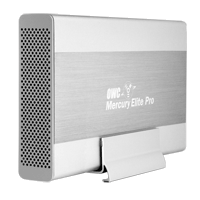 I've identified some serious problems with drive performance when daisy-chaining at Link TV. Daisy-chaining is a way to hook up multiple devices (in this case, hard drives) to one port (in this case, firewire). Firewire is theoretically supposed to handle 63 devices in one chain. I've been daisy-chaining firewire drives to FCP for 6 years, but Apple doesn't consider this a supported setup for editing.
Well, I've finally run into some real problems with daisy-chaining firewire drives. I've been seeing some real poor performance out of drives. Symptoms include aborted file transfers, the hanging up of the system when a movie is played, and very slow write performance. I think I've figured out the cause. There seems to be some problems mixing certain drives in one chain. In particular, I think certain drives from Other World Computing (OWC) don't play well with other drives, in particular drives from G-Technology, like the G-Raid. OWC makes the Mercury Elite Aluminum Pro drive and RAID. G-Technology makes the G-Drive and the G-RAID.
The workaround I've identified is to make sure that a chain of drives is all from one manufacturer. For example, in our dub room setup, the G-Drive is on a firewire 400 port and the OWC drives are on the Firewire 800 port. Our computers in Edit 2 & Edit 3 have PCI cards that add 3 firewire 800 ports. So there are a lot of ports there, and it's easier to segregate OWC and G-Technology drives.
So far I've been able to diagnose this problem by checking the read/write performance of drives when I think there is a problem. I've been using the SpeedTools utility QuickBench to check drives by running the Extended Test with 20-100 MB files. If you are seeing a drive read or write at 10 MB/sec or slower then something is seriously wrong. If you think daisy-chaining may be the issue, a quick way to check is to unplug all the drives except the one that is acting up. If you then retest the drive and performance is way up, then you probably are dealing with a problem with daisy-chaining.
I've seen other, less serious problems with daisy-chaining. My write speeds on G-RAID's drops by about half when they are daisy-chained. This is a nuisance, but it's never really interfered with my work. I'm not doing any capture of 10-bit video or anything too demanding luckily.
Monday, October 8, 2007
DIY Teleprompter
 Creativity to Spare claims that you can make a decent teleprompter with glass from a picture frame. I can't vouch for that, but it wouldn't cost any cash to check it out.
The tutorial also includes a link to a build-your-own teleprompter product (see image) that includes beam splitter glass, like that used for real teleprompters. Looks like about $100 for a good piece of beam splitter glass and for $250 you can get a kit that includes a stand (looks like it has adjustable height). Tutorial also includes links to free Mac software to flip your type, so that it looks right in a mirror.
For a full-featured product at the low-end, Prompter People offers a 15" Teleprompter with a stand and an LCD screen for $1299.
[via FreshDV]
Saturday, October 6, 2007
Canon's 24F Format in FCP
 "Final Cut Pro 6 Techniques: Editing with Canon’s 24F"
A short article on dealing with Canon's flavor of HDV at 24 fps and cutting with it in FCP. Canon's A1, G1, and XL-H1 all have this mode as an option, as well as 30F and good-old 60i.
But editing in 24 fps video isn't right for everyone. If you are going for a filmic-look and you're not mixing in footage that's 60i and and your distribution format is DVD--then 24 fps makes total sense. But 24 fps and all its various flavors that manufacturers have created, can cause lots of headaches in post. Here's a commentary on trying to work with 24fps for broadcast purposes over at Little Frog in High Def.
[via Digital Camcorder News]
Wednesday, September 26, 2007
Compressor 3 Tutorial
"Compressors' New Interface"
I just took a glance at this, but it looks like another good article over at kenstone.net. Not only does it go over some basic things about getting around the new version of Compressor, but it looks like it does a good job of talking about how to encode for DVD's.
I had a lot of trouble with variable bit rate encoding with Compressor 2, so I've been just sticking with constant bit rate. But once I upgrade I'm going to have to figure out the average vs. max bit rates for variable bit rate encoding. Some stuff on that in the article, plus it will help you figure out the normalize setting for your audio.
[via Studio Daily Blog]
Monday, September 17, 2007
XDCAM EX Codec
 I tracked down some more info about the codec used for the new Sony XDCAM PMW-EX1 camcorder. As you can see from the table above, there are two general recording codecs. The HQ model has a higher maximum bit rate that is variable and also includes different resolutions--either 1920x1080 or 1280x720. The SP mode is basically the same codec as HDV 1080 line variation that Sony uses in the Z1 and V1. It is a constant bit-rate at 25mb/s at a resolution of 1440x1080. The advantage of working in this mode is that the signal is compatible with gear that knows HDV, like FCP or an HDV deck. So that while shooting, you could record to a Sony HDV deck or you could record with capture now in FCP through firewire out on the camera.
Interestingly, the SP mode has the same limitations on variable frame rate as other Sony camcorders, like the V1. That is, you can record 24p (or really 23.98p) but it it recorded with pulldown into a regular 60i (29.97interlaced) signal. So to edit that in native 24 fps, you need to remove the pulldown, which is tricky to do (especially so if you want to keep your timecode.) It looks like the HQ mode handles real variable frame-rate, recording the signal in the frame-rate that you set and not trying to squeeze (or stretch) it into 30 interlaced fps. All XDCAM EX media files have a MP4 (MPEG-4) wrapper.
No DV or DVCam recording. The bad thing about that is that you could have squeezed a lot more video on the expensive SxS cards with support for standard definition recording. Prices are around $500 for 8GB and $900 for 16GB now. With 16GB of memory you get as little as 50 min. in HQ mode, and exactly 70 min. in SP mode.
We are still waiting for a direct interface for importing from the memory cards into FCP. I'm not sure if there is any support right now for the files on the memory card and FCP yet, but hopefully Apple is working on getting a good solution soon.
Here's a direct quote from the rather large PDF that I got this info from:
The SP mode supports 1440 x 1080 resolution at 25 Mb/s,
which provides compatibility with HDV 1080i products.
Footage recorded in the SP mode can be seamlessly
integrated into HDV-compatible editing systems by
connecting the camcorder via the i.LINKTM* (HDV)
interface. It can also be recorded on XDCAM HD's optical
disc through the use of the supplied Clip Browser software.
Sunday, September 9, 2007
More Sony Camera Goodness
 Update: More info is rolling out about these cameras, including official annoucements from Sony for the new HDV mini and the HDV Full. They don't have official names yet even, but I'm copying these names from this awesome webpage that covers just about every piece of HD gear that would be of interest to the prosumer markert called Frank's Thoughts on HDV. I'd also recommend this analysis of the new Sony HDV gear at IEBA blog.
Sony is promising some HDV cameras with interchangable lens in 2008. HD for Indies has a short post about it and a YouTube video from the IBC conference (where I got the images.) The posts only mentions a handycam model, but the video shows a shoulder-mount HDV camera too with interchangable lens. Seems like Sony is finally taking HDV seriously as a pro format. I haven't seen anything official from Sony on this yet. Interesting that these cameras have a 1/3" sensors, but the XDCAM EX has 1/2" sensors but a fixed lens (of course, there are some XDCAM HD cameras with interchangable lenses that cost over $10k.)
Saturday, September 8, 2007
New Sony Memory Card Prosumer Camera
 Sony looks like it has a great new camera on its hands for the prosumer market. The PMW-EX1 records to solid state memory--a new format called SxS Pro. Unlike P2, it looks like there will be multiple manufacturers, which means lower prices in the long run. The EX1 should be selling in November for around $7,500 with two 8GB memory cards included.
For editors, very confusing what this means right now. The recording format is based on the XDCAM format, which is recorded on blu-ray optical discs. But EX1 tweaks the formats--different file wrappper and the option for higher resolution, a full 1920x1080. The new XDCAM EX format is not fully supported by Final Cut, but there might be some native support if you shoot in the right way with this camera--not sure. Also the camera has a firewire port on it that says HDV. The camera doesn't record in HDV but can it transcode? Lots of questions.
This camera looks like a giant step up from the Z1 in just about every way. If you want the low-down there are already a few articles on the web from folks who have been testing pre-production models. Here's a good overview from FreshDV of what info is out there about the EX1. Here are two in-depth articles, one from Nigel Cooper and another from Simon Wyndham. There are so many interesting new features on this camera, it's worth getting a broad overview.
I'm still not sold on the tapeless workflow, but this looks a great camera. I'm just worried about backup for this footage. Sony offers a unit that transfers from the SxS Pro cards to Sony's XDCAM discs (with some drawbacks as Simon Wyndham points out.) Otherwise, it's archive like you do computer data--either optical disc burning or stacking up hard drives on your shelf.
Wednesday, September 5, 2007
Random Thoughts on New iPod Lineup
 Go to Apple if you want the basics on the new iPod lineup and to oggle the goods. Here's some reactions that I've had to the new gear.
I'm glad that the new iPod Touch has WiFi. I'd like to see Apple do more with it. Granted, the Safari mobile browser is awesome and trumps any other lame WiFi application that any other portable media player has tried. I was hoping for live MP3 streams, i.e., internet radio over WiFi. Too much of a battery drain, maybe? I've heard a complaint about how quickly WiFi drains the iPhone battery.
Also I was hoping for podcast downloading over WiFi. For me, I try to download Democracy Now every morning before I go into work, but sometimes they're late or, or even more rare, I leave early. If I could download over WiFi then I could get the podcast at work and still listen to the news on the way home.
The only thing that can be downloaded on the iPod Touch over WiFi is music through the Store--which means that except for one song a week, you gotta pay. Instead of working on their partnership with Starbuck's, I wish Apple was opening up downloads of free podcasts.
iPod Touch has the same YouTube application that the iPhone has. I played around with YouTube on an iPhone at the Apple Store. I found Mosaic on it, but the interface was too tiny for me to figure out which date it was. Also WiFi doesn't seem as good a platform for spending downtime browsing the web or YouTube as high-speed cellular is--if you are in an area with WiFi then mostly likely you can get on a computer. I had my hopes for city-wide WiFi in San Francisco, but that's collapsed now after EarthLink pulled out. It sounds like the Starbuck's deal only allows you to browse the iTunes Store, not the web or YouTube.
I guess it's too much to ask to be able to be able to share songs with other iPod's and computers over WiFi--the record labels would freak out about that. "Hey buddy have you heard this song? No? Well then I'll just zap it to you over WiFi!" I hope someone comes up with a hack to do that. Even better, transfers from an iPod to your friend's computer--"Hey buddy, can I get all of the music in your iPod?" (Although with a sync cable and software, you can already do that without WiFi.) I'm guessing that the iPod Touch runs on OS X, like the iPhone. Seems like there's already a big group of folks hacking into the iPhone, and I hope to see some similar work done on the iPod Touch.
I also really want to see Flash on the iPhone, iPod Touch. Apple shows the New York Times homepage on their demo--oh, ignore the blank spot in the lower-left corner please. That's just where The NYT streams Flash videos. What's the holdup? Is Flash video too processer-intensive? Do Adobe and Apple have to reach some agreement?
Big price drops on the iPhone. Get a 4GB iPhone on clearance for $299, while supplies last. In the future, it's only the 8GB iPhone for $399.
Capture More Than One Source at Once

This looks like an interesting new product. It's called MovieRecorderDV. I got the details on this press release. It says it will capture multiple streams of DV video at once and cites an example of using a laptop to capture multiple sources. I can see it as a mini control-room-like setup in the field. Although I have some doubts about how many video streams could be handled on a single firewire bus, especially if you are trying to capture the video on that same firewire bus. Seems like you would need to record either to the internal drive or have another bus (either firewire or SATA) on an ExpressCard setup for a laptop. It's a bit pricey--around $900.
Another interesting application would be as a central recorder for a setup like Mosaic, where we are recording a bunch of stuff off-air. Instead of buying DVD-Recorders with hard drives, a central Mac could record multiple feeds at once. Softron has a product called DV Recorder, but I'm not sure if it's the same product. DV Recorder is programmable.
Or if you are a really productive editor, you can be capturing from multiple deck while at the same time, you are editing in FCP. How's that for multi-tasking.
There's also Movie Recorder for working with non-DV sources of video, like uncompressed SD. Another $900 for this too. How about some HDV support?
Wednesday, August 29, 2007
Check Your G5's for Leaks
 Several of the Power Mac G5's used a liquid cooling system. It's basically like having a radiator around your processors. Most of the G5's were air-cooled. I think it was only the dual 2.5 GHz released in 2004, the dual 2.7 GHz released in 2005 and the Quad G5 that had the liquid-cooling system.
I remember thinking at the time that I would avoid these systems because of concerns that the liquid cooling would eventually leak, damaging the computer. Well, we got a good deal on a dual 2.5 GHz in the summer '05 and it has been used to edit Mosaic since then. Knock on wood, no problems yet. I also use a Quad G5 now.
Xlr8yourmac.com is keeping track of reports of leaking G5's. Very disheartenging. These leaks cause major problems and Apple is not being too helpful with the very expensive repairs. Worth keeping an eye (or in some cases an ear) out for any potential problems--the sooner the leak is discovered, the better.
Photos here at hardmac.com. Warning, these are graphic images that some readers may find distrubing. Enough to keep me up at night.
Monday, August 27, 2007
Backing Up Projects
"DVD-Rs for Media Back-up in FCP"
This is a good article over at kenstone.net that I found over at freshdv.com. Good tips on archiving projects.
There's a lot in the article about what's the biggest size file that will fit on a single-layer DVD. I guess that's important if your project has long, uninterrupted footage or your dealing with codecs that are more data-intensive than DV. Usually I find in my project that the media manager will cut my media files down to size. However, sometimes I'm preplexed when the trim clips feature doesn't work with media manager and I think it should.
Thursday, August 23, 2007
Neither Fish Nor Foul
 Sony just announced a new HDV camera that is sort of a maddening combination of pro and consumer features. It's called the HVR-HD1000U.
The positives:
-Only $1900
-Shoulder-mounted (Sony's first for HDV)
-Either viewfinder or LCD screen apparently usable while shoulder-mounted
The drawbacks:
-The same CMOS chip used in their consumer cameras
-I don't see any XLR sockets on that thing
-No announcement for progressive shooting modes like on the V1
After working on a shoot this weekend in the bright California sun, I remembered the benefits of a good viewfinder (not sure if this is indeed a decent viewfinder.) Shoulder-mount is great for handheld shooting, but you have to deal with the bigger body size when lugging it around. No XLR audio is sort of a deal-breaker for me. Seems like this is mainly for wedding videographers. Available in Dec.
Update: Here is a good overview of what's lacking on this camera (e.g., good zoom lens), as well as something that I didn't know--Sony showed a pro HDV shoulder-mount mockup at NAB. Where's that, Sony? Also from the same site, a good, thoroughly-negative review of what's missing from one of Panasonic's "pro" cameras AG-HSC1U.
Tuesday, August 21, 2007
Bad Firewire Ports on Decks
 We just got a bad firewire port on a Sony HDV deck (HVR-M10U). It looks to me like a wear-and-tear issue--the deck gets moved around a lot with lots of folks pluging in cables and taking them out. I was talking to our repairperson from Advanced Systems Group, and he offered some advice on how to deal with firewire on decks.
Our repair guy, Al, says that he has seen a lot of firewire ports on decks go bad. I think he was describing a different kind of problem--our port looks rather mangled, which IMHO is the cause of the problem (a cable won't even fit into the port.) But he says that the firewire port on decks often die without any visible wear-and-tear (especially 4-pin ports, which is what Sony uses on its prosumer and consumer gear.) Here's a a workflow that Al recommended to help prevent dead firewire ports:
Connecting a deck with firewire to a computer
-Make sure nothing is plugged into the deck, especially a power cable
-First plug the firewire cable into the computer
-Then plug the firewire cable into the deck
-After that, plug in the other cables and power up the deck
Apparently, one possible cause of bad ports is trying to plug a firewire cable in backwards, which I think is easier to do on a computer with a 6-pin connector. If you plug a firewire cable in backwards either on the deck or on the computer (when the deck is plugged in on the other end) then this can kill the port on the deck. You may think this is hard to do, but I've heard first hand of an anonymous someone who did this on a hard drive (thus, killing the firewire port on the hard drive.) I have an old G4 that had lots of problems with firewire 400 ports going bad.
I've heard that firewire 800 is a lot more resilient to these types of problems. That's one reason why I always try to use firewire 800 interface--if a hard drive has both a firewire 400 and a firewire 800 port, I always cable with the firewire 800 port if possible. Despite what the terminology implies, only under ideal situations do I find that I really get a lot more performance out of firewire 800 than firewire 400 (see my post "The Trouble with G-RAID's"), but for me it's worth it to use firewire 800 for the added peace of mind.
If you want to get all nerdy on firewire problems, I'd recommend this article "FireWire Port Failures in Host Computers and Peripheral Devices" over at the Wiebetech site.
Sunday, August 12, 2007
iMovie 6 for Free
Apple released iMovie '08 (skipping '07 all together) as part of the new iLife '08 suite. Apple has really changed the application--some say for better, others for worse. I like that it provides a way to catalog video like you can catalog photos in iPhoto. I have a new niece, and my Mom is going bonkers recording movies on her flash-memory camera/camcorder. This new iMovie will be great for sorting through all those movies easily.
They have also simplified the edtiting process. After watching demos, it does look like it is a really fast way to put something simple together. I taught my Mom iMovie, and it was maddening for me to figure out how to cut in older versions of iMovie. But some features have been taken out it seems in transitioning to the simpler editing approach.
Apparently to compensate for high system requirements for iMovie '08, Apple is giving away iMovie 6 (the previous version) for free here. You're supposed to have iLife '08 to install it, but there are workarounds. xlr8yourmac.com has details on the workarounds (sorry, I don't have a direct link to the workarounds info on the site.)
Wednesday, August 8, 2007
Automatic Sync's Caption Sync
I recently tried out an interesting new service provided by Automatic Sync called CaptionSync. We needed to get a program closed-captioned for a feed to PBS stations. Captioning is usually either labor-intensive (not real-time) or poor quality (real-time.) And for labor-intensive, also assume expensive. Not only is it expensive to pay an operator to spot all of the subtitles, but the gear to encode the closed-captioning isn't cheap either.
I found CaptionSync a good alternative to traditional closed-captioning. CaptionSync is a web-based service that essentially works on voice recognition. Now, you need to provide the service a transcript--it can't create a transcript from just audio. But you send CaptionSync the audio, and then it will spot your subtitles for you. After uploading a transcript and an audio file, you wait a couple of minutes and then you get an email with your captions in whatever format(s) you asked for. My cost was $45 for a half hour, and I think that's pro-rated based on $90/hour.
There are a few tricky things with the service. They recommend that the audio you send them only include the voice to be captioned/subtitled. I was sending them a documentary, so I had to make a pass on the film and delete all the audio clips that had no voice or were in a foreign language. Some time, but not too bad. The quality of the spotting was good but not perfect. I had a problem getting one bit of dialogue recognized, maybe because the speaker had an Arabic accent. You can resubmit the job if you aren't happy with the results. For example, I accidentally left in some Arabic voice in the audio track that I sent them, and it totally screwed up the subtitles. So I made a different audio export with no Arabic and then the captions were back on track. I also was able to do some tweaking with the formatting after checking out my results. Again, not a problem to resubmit a job with no extra charge.
Now, the tricky part came in getting the closed-captioning into my program. There is software that will encode closed-captions into a QuickTime movie. It's called MacCaption, and it costs $1000 for a DV version and $2000 for an uncompressed version. No, I didn't add an extra zero. That's one to two thousand dollars just to encode the closed-captioning data into video. Obviously buying the software would blow my budget. So I figured out a work-around. Here's what I did.
I asked CaptionSync for an STL file with my captions. DVD Studio Pro uses STL files to generate closed captions. So I burned that to a DVD. Then I played back that DVD and captured the video as uncompressed. The uncompressed capture records the closed-captioning which is in the vertical interval of the video signal. Now, I don't actually want to use video from the DVD--as it has been heavily compressed and then gone through an analog generation. So I composited the video of the program on top the captured video clip with the captioning. I cut the show in the DV codec, so the program's video didn't overlap the captioning. However, I think an uncompressed clip would normally cover up the captioning because uncompressed video has more lines of video than the DV codec handles. In that case, the solution is to just add a bit of video cropping to the top of the video and the captioning will be revealed. I was working with a TV that could display the captioning while I was doing all of this--to make sure that I had the captions and they were staying in place. Then I mastered to Betacam. I think closed-captioning is supported with DVCam, but I don't know how to make that work.
My work-around was time-consuming, but it didn't cost me any more $$'s. If fit my criteria of cheap with a good-looking master and good (but not perfect) captions. If I was going to be doing this regularly I'd have to think seriously about MacCaption's software encoding of closed-captioning.
Monday, August 6, 2007
"Making 3D Text" in Motion
 This seems like a handy tutorial on Motion 3 over at the Creative Cow. The technique in the tutorial lets you add some depth to type in 3d space. The whole 3D thing with cameras and lights is new in Motion 3.
The EditBlog has a post about another cool thing for Motion 3--a free plug-in called Vee You. It creates the effect of VU or EQ meters that actually reflects an audio track. You get the plug-in here.
Thursday, August 2, 2007
Bad CCD's in Sony and Canon Cameras & Camcorders
 This Sunday I found out my Canon Powershot SD100 digital camera was dead. It was 3 years old, and I figured it had reached a natural, if early, death. Truth be told, I was looking forward to getting a big upgrade from my old 3 mega-pixel camera with its tiny screen.
But lo and behold, I just read a blog entry at FreshDV describing a problem with CCD's in Sony and Canon gear. After some more searching, I found out my model of camera is affected by this problem. Canon will supposedly fix this problem for free, even if the gear is out of warranty. Sony has a similar arrangement (with some looming time restrictions).
Sony's bad CCD's affect some prosumer gear. Here's a list that I pulled from FreshDV:
DCR-VX2000
DCR-VX2000E
DCR-VX2100
DCR-VX2100E
DSR-250 & DSR-250/P
DSR-PD150 & DSR-PD150P
DSR-PD170 & DSR-PD170P
DSR-PDX10 & DSR-PDX10P
More detailed information on the problems and the response from Sony and Canon is here.
Thursday, July 26, 2007
Impressive SmoothCam Example
 This is a cool example of what SmoothCam can do. Before, shooter handholding a Sony Z1 while walking backwards as actors stroll. Afterwards, looks like it was shot on a dolly. Very impressive. Scroll down the page to see the before and after movies.
My concern about SmoothCam is that the footage must either be progressive or high-def. Standard-def, interlaced video would take too much of a hit from the processing that SmoothCam would have to do--namely deinterlacing and then scaling up the video.
If you didn't know already, SmoothCam is a new feature in Final Cut Pro 6 and Motion 3.
Tuesday, July 24, 2007
Creative Cow Recommends RAID-5 System
Here's a review at Creative Cow that recommends a system for a RAID-5 setup from Dulce. The reviewers says that is has very good ease-of-use and is pretty darn fast.
I've written before about RAID-5 here. This Dulce system does RAID-3 too. I'm not even sure what that is. The low-down on RAID-5 is that your data is stored across an array of hard drives and if one dies, then you don't lose your data.
My latest thinking is that hard drives are so cheap, why not just backup up all your data to cheap USB hard drives. No, you can't keep working immediately if a hard drive dies, but at a quarter per GB, you can't really get much cheaper than that. Use Retrospect or your backup app of choice to backup up your media drive at night. USB isn't fast enough to edit with, but the transfer times are OK. With USB drives, it's pretty easy to expand storage, the capacity of the drives are high, and did I mention it's cheap. At least you have peace of mind if not 100% certainty that you won't miss a deadline if a hard drive dies.
Wednesday, July 11, 2007
Sony Offering Rebates on HDV Gear
Sony is offering mail-in-rebates for HDV gear bought between 4-1 and 9-30. Here's the after-rebate prices on Sony HDV gear at B&H (rounded up):
HVR-Z1U $4,100 ($300 off)
HVR-V1U $3,600 ($300 off)
HVR-M25U $2,800 ($100 off)
There are also $300 off of the HVR-A1U and some other deals for a LCD HD monitor. More details and links over here at FreshDV.
HVR-Z1U $4,100 ($300 off)
HVR-V1U $3,600 ($300 off)
HVR-M25U $2,800 ($100 off)
There are also $300 off of the HVR-A1U and some other deals for a LCD HD monitor. More details and links over here at FreshDV.
What You Could Do with Color
Yesterday, I pointed out some tutorials for Apple's Color app. To see what you could do with Color, check out this posting by Stu Maschwitz over at ProLost. Stu made a sort of before and after color grading using stills from the movie Transporter 2. Gives you an idea about how the feel of an image can be radically changed with color grading.
I've written about Stu before and his book "DV Rebel's Guide", which provides guidance and even some basic tools for color grading.
I've written about Stu before and his book "DV Rebel's Guide", which provides guidance and even some basic tools for color grading.
Primer on Audio for Video
 "Upgrade Your Images with Audio: A primer on audio monitoring for HD video editors" by Mike Curtis
I recommend this article over at DV.com (registartion req'd). Goes through various setups for montioring audio from budget to pro surround sound. Recommends some actual gear to get, which is helpful. I'm not an audiophile and I can't really figure out which speaker is better than any other. I've sort of just latched onto M-Audio because I recognized the brand and their prices seemed reasonable. Now Mike Curtis from HD for Indies has given me some ideas for speakers the next time I'm setting up an editing system. Also here's a link to Mike discussing the article and some others on audio.
Tuesday, July 10, 2007
Video Tutorials on Color
Walter Biscardi is working on a series of tutorials about Color over at Creative Cow. As a total Color newbie, the tutorials gave me much more of an impression about what an alien product this is compared to any other Mac app that I'm working with. There are 3 videos in the series so far--short and worth watching if you are wondering about Color.
Copying Content from your iPod to your Computer
"Copying Content from your iPod to your Computer - The Definitive Guide"
A very in-depth article on the subject. Basically I see two times when you want to get content off of an iPod (instead of onto it): 1) Your computer crashed and the only backup of the music or video is on the iPod 2) You want to share music or videos that are on an iPod. If you are doing the latter, just skip to the article's section on applications that help with copying. A free app for doing this on Macs is SenUti.
One thing I learned from the article is that Apple changes the format of its database of music with new versions. So if you are using an app to access your iPod, it can be a problem if the app is not up to date.
Monday, July 9, 2007
The Trouble with G-RAID's
I often get asked for recommendations for hard drives for editing. Personally, I've probably bought 10 G-RAID's in the last couple of years and haven't lost any data yet (knock on wood.) Although, I know folks who have, and I have had some problems with these units.
One of my big concerns with G-RAID's is that they are RAID 0. As this article ("Don't get burned by RAID zero") points out RAID 0's have three potential points of failure--two hard drives, and the RAID controller. If any of these fails, you are hosed.
I also recently discovered that G-RAID's performance drops significantly, even dramatically, when used in a daisy-chain fashion (especially write speeds.)
At the moment, I'm still not satisfied with the alternatives for my lean budgets. So I'll probably buy some more G-RAID's in the future, but when people ask I can't whole-heartedly recommend them.
Sunday, July 1, 2007
Prices Dropping on Big LCD Displays
 For years, I've been dreaming about replacing my two small LCD monitors with one 24" LCD display. This year has seen some big prices drops with a lot more competition in the 24" LCD market.
A big benefit of the 24" LCD is its resolution, which can display the full raster of 1920x1080 HD video. Some displays like the 24" from Gateway even do a decent job of displaying HD video, as well as working as a good computer display. (BTW, in tests I was not happy with how the Dell 24" LCD did displaying video--it makes a great computer monitor though.)
Now competition is heating up with more LCD brands getting in the mix. Within the last year there was a lot of competition in the 22" and 20" display range and prices have fallen dramatically. I even see deals for a 20" display for around $200 at dealmac. Last year, you couldn't get a 24" below $600. Now CompUSA has an Acer 24" for $450. I can't say if this is a decent display, but it definitely signals some changes in pricing. Viewsonic is selling a 28" display with 1920x1200 raster for about the same price as a Dell 24" display. Makes 24" sound kind of paltry.
Apple isn't interested in price competition. They excel at style and they don't really have any competition in that game. Their 23" is still running at $899. There are some legitimate reasons to choose Apple's 23". Not just to impress clients. Namely I was thinking of its ability to do a great job of displaying HD for criticial applications with products like the Matrox MXO.
Saturday, June 30, 2007
Macworld Reviews Final Cut Studio 2 (Updated)
UPDATE: Macworld added their review for Compressor. Highlights of Compressor 3: Optical flow does good job frame rate conversion (e.g., 60i to 24p), easier clustering (including on one system), streamlined interface (oh no, does that mean we have to bid adieu to Batch Monitor!?), watermarking, more formats supported.
MacWorld has revews of all the new apps in Final Cut Studio 2, except for Compressor. Worth a read, especially if you haven't been keeping up on what's new in these Apps
Motion 3
I think the first paragraph really sums up the value of Motion:
Color
Caveats galore for Color--just because you edited something in FCP doesn't mean that it will work in Color. This article doesn't even mention the problems with the HDV format that the Creative Cow mentioned. I imagine when I start using Color, it would just be for a shot or two at a time and not taking in a whole project. So far, this is how I've also used...
Soundtrack Pro 3
Final Cut Pro 6
Review by Mike Curtis of HD4ND's fame.
MacWorld has revews of all the new apps in Final Cut Studio 2, except for Compressor. Worth a read, especially if you haven't been keeping up on what's new in these Apps
Motion 3
I think the first paragraph really sums up the value of Motion:
Motion, Apple’s motion-graphics and video-processing software, has always stood apart not so much for what it does but the way it does it. In many visual and video tools, you spend much of your time preparing graphics and then watching rendering progress bars, but Motion’s workflow is built around real-time adjustment and experimentation. With Motion 3, Apple has focused on the major capabilities previous versions lacked: motion tracking and stabilization, painting tools, and a true 3-D graphical environment to augment speed and easy, improvisational control. Motion may not become your only motion-graphics program, but it could easily become your favorite tool for quickly creating visuals
Color
Caveats galore for Color--just because you edited something in FCP doesn't mean that it will work in Color. This article doesn't even mention the problems with the HDV format that the Creative Cow mentioned. I imagine when I start using Color, it would just be for a shot or two at a time and not taking in a whole project. So far, this is how I've also used...
Soundtrack Pro 3
Final Cut Pro 6
Review by Mike Curtis of HD4ND's fame.
Thursday, June 28, 2007
Final Cut Studio 2 gets x.0.1 Updates
All the apps in Final Cut Studio get updates--looks mostly like bug fixes. HD for Indies has good coverage of what is in the update here.
One big addition is support for the AVCHD format, which is mainly consumer-oriented. However, Panasonic has been using it widely, including within its pro line of cameras with the small AG-HSC1U
One big addition is support for the AVCHD format, which is mainly consumer-oriented. However, Panasonic has been using it widely, including within its pro line of cameras with the small AG-HSC1U
Monday, June 25, 2007
More Scope Software
 This is a follow-up to a recent post about using software to mimic a waveform monitor and vectorscope. A dedicated pair of waveform monitor and vectorscope aren't cheap--for composite video, new can cost you almost $4K. I've tried buying used ones, and it is a pain. For a decent used set from a reliable vendor for composite analog video, you are looking at $1,500 easy. While I really like being able to have a dedicated display for my levels, some new software apps are worth looking into.
Hamlet Vidscope-VX a Windows-only application. I read a short plug for this recently in the Creative Cow magazine (offline only). The HD version is supposed to go for $995. The SD version for $665. Seems steep but in comparison to a dedicated waveform monitor and vectorscope it is reasonable. You'd need a host PC and capture hardware for the setup.
ScopeBox is a Mac app. This is geared toward production, but it looks like it will do a strong job of mimicing a waveform and vectorscope from the demos on their web site. $799 for HD (doesn't handle HDV), and $399 for SD.
VeeScope Live from the makers of DVDxDV comes in at $99. Again, geared toward production. I haven't tried it out, but I'm not even sure you can get a simultaneous display of vectorscope and waveform.
Adobe OnLocation CS3 part of Adobe Premiere Pro CS3 ($799 retail, under $400 nonprofit). Adobe incorporated an app called DV Rack into the new Adobe Premiere and changed the name to OnLocation. OnLocation only runs on Windows but it looks like it will come bundled with the new Mac version of Adobe Premiere.
And of course, there's always Final Cut Pro. You can also turn on the Video Scopes in Final Cut Pro to get an idea about both video and audio levels. These setups alway require a host computer that should be pretty much dedicated just to this task. And these Mac programs tend to recommend beefy systems. You also need to get video into the system. Firewire might work, but a dedicated capture card might work better too.
Sunday, June 24, 2007
DIY C Stand
 Here's an interesting

Wednesday, June 20, 2007
High-Def Camera Monitornig Software
 Monitor Magic does DV and HDV monitoring for $89. I've always struggled about the real value of these monitoring applications for me. After all, you can just use FCP's capture tool to monitor DV and HDV and get scopes too. But Monitor Magic has a nice new feature. You can mointor more than one camera at the same time. That seems like it would be pretty taxing on a computer. They recommend at least a G5 or Intel chip for HD--so no old iBooks or PowerBooks for monitoring an HDV signal 14-day preview version is available.
UPDATE: VeeScope Live $100 from the makers of DVDxDV will also display multiple inputs.
Tutorials and Demos Galore
"A look at lights in Motion 3"
"Click-thru Tutorial: Magic Bullet Looks"
"Click-thru Tutorial: GenArts Sapphire"
"Creating Node Trees in Color and the special case of interlaced video "
"Creating Footage with Shatter and Particle Playground" (After Effects)
These are all worth a look. New features in Motion and Color. No shadows in Motion 3--darn. Magic Bullet and Sapphire aren't something that I'll be using anytime soon, but it's interesting to see what they can do & gives me a few ideas. I haven't used particles in After Effect, but this article could get me started.
Friday, June 15, 2007
Multiple Instances on Compressor 3
"How to Make Compressor 3 Encode much, MUCH faster"
HDforIndies.com shows you how to increase the number of instances for rendering in Compressor 3. This can help maximize CPU usage if Compressor isn't using as much CPU as it can. It also refers to a BareFeats article that has some examples of how much multiple instances can improve rendering time.
HDforIndies.com shows you how to increase the number of instances for rendering in Compressor 3. This can help maximize CPU usage if Compressor isn't using as much CPU as it can. It also refers to a BareFeats article that has some examples of how much multiple instances can improve rendering time.
Wednesday, June 13, 2007
MPEG Streamclip Review
Here's a gushing review of the free MPEG Streamclip. I haven't used MPEG Streamclip in a while. This article recommends it for converting DVD's to DV but I never got that to work with interlaced footage. Maybe I should try again with the newest version. Mentions that it does a good job transcoding Flash videos and also includes some iPod presets for h.264 encoding. The article talks about how to edit with MPEG Streamclip. I also wrote about this a while back in this post.
UPDATE: A second post goes into a lot of basic how-to's for all kind of copying and trans-codings for DVD's and Flash movies. Includes a "Mac All-Star Video Software Links".
UPDATE: A second post goes into a lot of basic how-to's for all kind of copying and trans-codings for DVD's and Flash movies. Includes a "Mac All-Star Video Software Links".
More Creative Cow on ProRes
"Part 2: ProRes for HDV, with a splash of Color"
More nitty gritty fromt the Creative Cow on using ProRes 422. Here's my big takeaway:
So basically if you have HDV footage you can capture it as HDV over firewire, and don't need to think about how you would transcode it to ProRes or rig your system to capture it to ProRess, which you can't do while capturing over firewire. Capture to HDV, but render in the timeline to ProRes 422.
Apparently sending HDV to Color and then rendering back to ProRes is totally screwed up. All your clips get out of sync. Seems like Apple didn't put the kind of quality control into Color as they do FCP before releasing.
Also an interesting note about removing pulldown on 24p footage, as an update to my previous post. Compressor 3 has a smart pulldown remover where you don't have to worry about the cadence of the pulldown. The downside is that you lose timecode.
And the article says that capturing to standard-def ProRes 422 is OK on a Quad G5. But for HD ProRes you need at least a quad-core Intel.
More nitty gritty fromt the Creative Cow on using ProRes 422. Here's my big takeaway:
PPPS. Just so there's no question here: most (but not all) of you are certain that native HDV capture is the way to go. Skip AIC. Skip DVCPRO HD. Just render to ProRes.
PPPPS. Of course, some of this changes once we add a little Color.
So basically if you have HDV footage you can capture it as HDV over firewire, and don't need to think about how you would transcode it to ProRes or rig your system to capture it to ProRess, which you can't do while capturing over firewire. Capture to HDV, but render in the timeline to ProRes 422.
Apparently sending HDV to Color and then rendering back to ProRes is totally screwed up. All your clips get out of sync. Seems like Apple didn't put the kind of quality control into Color as they do FCP before releasing.
Also an interesting note about removing pulldown on 24p footage, as an update to my previous post. Compressor 3 has a smart pulldown remover where you don't have to worry about the cadence of the pulldown. The downside is that you lose timecode.
And the article says that capturing to standard-def ProRes 422 is OK on a Quad G5. But for HD ProRes you need at least a quad-core Intel.
Tuesday, June 12, 2007
Sony V1U and 24fps
 "Editing the V1's 24p in Final Cut Pro: A Workaround"
The Sony V1U is the first HDV camera to shoot real 24 frames per second with 1080 lines of resolution. There's no native 24fps editing of this format in FCP (yet.) In the mean time, this article describes a workaround to edit in true 24fps mode your 24fps HDV 1080 footage. Basic description of the issues with pulldown and removing pulldown is in the article too
[via FresHDV]
UPDATE: HD for Indies has this post "Working with 24p for Canon HV20". Apparently, Compresor cannot reverse telecine fromt the HDV codec. Its reverse telecine won't work with interframe compression schemes. Thus you have to transcode the HDV footage to AIC (Apple Intermediate Codec) or ProRes 422 to get get Compressor to reverse telecine.
HD Discs and Macs
Steve Jobs' keynote at WWDC was a bit of a downer. No new great hidden features were revealed, just some Finder improvements. Some of the new iChat stuff was interesting. I could see using the iChat Theater to review an edit. The iChat Screen Sharing could help me show my parents how to do stuff on their Macs. The ability to easily set up access to a remote computer with .Mac could be handy if I can get it to work with the company firewall and get into my office network.
I was hoping there would be an annoucement about Mac's supporting either Blu-Ray or HD-DVD, so we could get a little high-def movie action on Mac's. Vista can handle playback of these formats, and PC makers are already selling desktops and laptops that will playback both formats, but nothing for Mac's. Is Apple hoping to make a splash of their own with a high-def movie rental service? I hope they don't treat HD-DVD and Blu-Ray as threats and ignore support. For us video professionals, we can't afford to lose support for any type of major distribution format because Jobs is trying to capture the market on digital movies, like he did with digital music.
"Leopard to support HD DVD and Blu-ray?"
"Apple shooting for autumn launch of film rental service - report"
Monday, June 11, 2007
After Effecst CS3--Runs Faster
"Adobe After Effects CS3: Cranking it up to 11" from Studio Daily
"ADOBE AFTER EFFECTS CS3: A justification for buying an 8-core Mac Pro" from Bare Feats
Reviews and tests of CS3 are rolling in. To me, the big news is that CS3 is running much faster on both G5's and Intels. The last version After Effects 7 was not a Universal Binary and wasn't designed to run on Intel chips. But looking at Bare Feats tests, there are big performance gains to be had for G5 owners too by upgrading to CS3.
The other big feature that I would use is 3-D text animation. Good thing Adobe added this, otherwise Motion would really begin to push past After Effects on the features for the type of quick-n-dirty motion graphics that I do.
Saturday, June 9, 2007
Digitial TV Conversion
 "Converters Signal a New Era for TVs" (registartion required)
This is a good article about the upcoming switch-off of analog over-the-air TV, which I actually still use. The article discusses the government program to help subsidize the purchase of digital TV converter boxes, so that folks like me can still use our analog TV's and get free TV after the switch-off.
I tried out digital over-the-air TV, which runs on the ATSC system, a couple of years ago when I bought one of these digital receivers. The reception was poor, much worse than with analog TV, and the receiver was expensive--over $150. So I returned it to the store and have been happily watching "Lost" in analog since then. This NYT article says that manufacturers are aiming to start selling these next year for $50-$75. Hopefully either the reception of the tuners or tranmission by the broadcasters is better then than what I saw 2 years ago--or I may have to start paying for TV.
UPDATE: There's an in-depth article over at Consumer Reports on getting over-the-air digital TV.
Friday, June 8, 2007
Creative Cow on Apple ProRes 422
"The Wisdom of the Cow: Apple's ProRes 422 Codec"
This is a good article that summarizes insights on the ProRes 422 codec gleamed from posts on Creative Cow's boards. Nice to get some real user feedback on this new feature of FCP 6.
One thing that has come out is that if you want to transcode HD to ProRes 422, you need an Intel MacPro or an AJA I/O HD. It's too processor intensive to be done while capturing, even by a Quad G5. The AJA IO HD handles the transcoding itself, but with other hardware from AJA and Blackmagic the CPU has to handle the transcoding. However, slower computers can still render HD video to ProRes 422. Nothing definitive on transcoding to SD while capturing, but this should be much less processor-intensive than HD footage.
Tuesday, June 5, 2007
Motion Tracking Tutorial
"Warp Speed Workflow #5: First Look: Motion Tracker in Motion 3"
This is a helpful tutorial movie over at dvcreators.net. Shows you how to do motion tracking in the new vesion of Motion. Unlike Apple's demos where the motion tracking just magically works perfectly, this shows you what to do when there are problems. Basically, Motion is analyzing the video trying to follow a particular object around the screen, and it is only so smart. So when it gets distracted and loses track of the object you define, you have to set it back on the correct path.
At an Apple demo, they showed where Motion will suggest tracking points. I think maybe you hold down the Option key to see recommended tracking points, but I can't remember for sure.
Monday, June 4, 2007
Real video helps with saving videos
Real video seems to have fallen fatally behind in the video streaming arena, now that Flash has emerged as the dominant streaming video format and the powerhouses of Apple and Windows stay strong with their online media presence. But it sounds like Real is putting some interesting features into a new version of their player. They are making it very easy for users to download and save videos in a variety of formats (Flash, Windows Media, Quicktime, and, of course, Real.) They are also offering some features to burn video to discs for playback in DVD players. Read about this over at hardmac.com.
How much is that old Mac worth?
This is a cool site. mac2sell.net estimates the resell value of your old Mac. You enter in your specs and it guesses the value. I'm not sure how accurate it is, but it's a place to start when thinking about how much you might get if you want to sell (or how much is reasonable to pay if you want to buy.) My iBook G4 933 MHz is worth $440 according to them.
"Final Cut Pro 6 - A First Look"
Check out this article at kenstone.net. Goes into the new features in FCP 6 from an expert who's actually used the new stuff. Gives you a more hands-on feel for how things actually work, like Open Format Timeline, SmoothCam, round tripping, and more. When you're ready to start using FCP 6, I recommend this to get an overview of how to actually use some of the new features. [via camcorderinfo.com]
Friday, June 1, 2007
Photoshop CS3 Extended
"Photoshop CS3 Extended Review"
MacWorld UK gives an overview of the new features of Photoshop CS3 Extended, which is a new version of Photoshop with some specialized features. In particular, there are some new video and 3D features. You can paint frame-by-frame. Good for taking out dropouts, it seems to me. Also FX's work or rotoscoping.
MacWorld UK gives an overview of the new features of Photoshop CS3 Extended, which is a new version of Photoshop with some specialized features. In particular, there are some new video and 3D features. You can paint frame-by-frame. Good for taking out dropouts, it seems to me. Also FX's work or rotoscoping.
Thursday, May 31, 2007
Final Cut and SmoothCam
"Final Cut Studio 2 SmoothCam Tested: Fix Those Shaky Shots"
An overview with examples of using SmoothCam in FCP. SmoothCam uses "Optical Flow", which is technology imported from Shake, to the new Final Cut Suite. Gives some good advice on working with HDV--transcode to ProRes422 to dramatically reduce processing time. Very impressive what it does with shots from a car. Seems like Apple's SmoothCam is providing a great tool for removing unwanted motion in a shot. However, I think its value for interlaced standard-definition video is low because you lose so much resolution from the de-interlacing and the scaling that SmoothCam does. But I guess I should try it out before I make any judgments.
UPDATE: There are some more in-depth tests at The Edit Blog. Apparently, when you execute SmoothCam, FCP analyzes the entire source clip and not just what is cut into the timeline. The Edit Blog notes some improvement from using ProRes422 over HDV (36 min. vs. 53 min. on a 12.5 sec clip). But it looks like the big improvements in analysis time cited above are probably confounded by the creation of a smaller source clip when the video was transcoded to ProRes 422. [via FreshDV]
Bottom line: The results are good but the analysis time on SmoothCam is slow. Dual 2.7 G5 estimated 5 hours to process one and half minutes of HDV. Did I mention that the analysis takes place in the background, so you can keep working while FCP analyzes the clip?
Wednesday, May 30, 2007
Rendering 10-bit in After Effects
With ProRes 422, I think I might start working in 10-bit video. Below is some info on working with 10-bit and ProRes 422 in After Effects. Pretty deep stuff, but apparently it can take some work to get After Effects to work with 10-bit well. Info from HD for Indies and Studio Daily.
After Effects Stuff: Workflow tips and QT NOT always 10bit when you render"
"The great codec bake-off"
After Effects Stuff: Workflow tips and QT NOT always 10bit when you render"
"The great codec bake-off"
Thursday, May 17, 2007
What's New in FCP 6
Final Cut Studio 2 is now shipping. I don't know when I'll get my hands on it, but Apple has posted many of the manuals online. I took a look at the manual What's New in FCP 6. I've written before about my thoughts on FCS2 and FCP6, and here's some new things that jumped out at me after reading that manual.
SmoothCam Filter
This borrows Shake technology to steady shaky footage. This seems to be the only implementation of Shake in FCP according to the "What's New" manual. If so, then no great slo-mo's in FCP. Looks like you'll have to go to Motion for those.
Bloom FX
More FX's from Motion are coming to FCP. I like the Bloom filter and there are a few more.
Rendering Native HDV and XDCAM HD Sequences to the Apple ProRes 422 Codec
This is a new sequence preset. So as I discussed before here, it makes less and less sense to transcode HDV to another codec, like uncompressed, when capturing. With the Open Format Timeline you can load and cut your native HDV footage and then render in whatever codec you like (uncompressed, ProRes 422) when you want to filter or composite.
External Video Monitoring
This is very cool. I don't remember hearing about this capability when the new version was announced. Here's something I pulled from the manual:
Before you had to rely on hardware from AJA or Kona to do stuff like this. Now FCP and your Mac's CPU will handle this. Of course, if you are throwing an Open Format Timeline and down-conversion at the CPU that's a fair amount of work. The better the chips you have, the more luck you'll have with this type of stuff. But I pretty much got a DeckLink card because I wanted the option of seeing HDV downconverted to SD (the Kona LS wouldn't do that.) Now Kona LS users will get this capability with FCP 6 if their computer is fast enough.
For more on the new manuals for Final Cut Studio, check out this post at HDforIndies.com.
SmoothCam Filter
This borrows Shake technology to steady shaky footage. This seems to be the only implementation of Shake in FCP according to the "What's New" manual. If so, then no great slo-mo's in FCP. Looks like you'll have to go to Motion for those.
Bloom FX
More FX's from Motion are coming to FCP. I like the Bloom filter and there are a few more.
Rendering Native HDV and XDCAM HD Sequences to the Apple ProRes 422 Codec
This is a new sequence preset. So as I discussed before here, it makes less and less sense to transcode HDV to another codec, like uncompressed, when capturing. With the Open Format Timeline you can load and cut your native HDV footage and then render in whatever codec you like (uncompressed, ProRes 422) when you want to filter or composite.
External Video Monitoring
This is very cool. I don't remember hearing about this capability when the new version was announced. Here's something I pulled from the manual:
You can now output to external video interfaces whose settings don’t match those of your sequence. Here are some examples of some of the possibilities:
-A DV or HDV sequence output to an SDI signal on a third-party interface
-An uncompressed NTSC or PAL sequence output to a DV FireWire output
-An HDV sequence output to a DV FireWire output
Before you had to rely on hardware from AJA or Kona to do stuff like this. Now FCP and your Mac's CPU will handle this. Of course, if you are throwing an Open Format Timeline and down-conversion at the CPU that's a fair amount of work. The better the chips you have, the more luck you'll have with this type of stuff. But I pretty much got a DeckLink card because I wanted the option of seeing HDV downconverted to SD (the Kona LS wouldn't do that.) Now Kona LS users will get this capability with FCP 6 if their computer is fast enough.
For more on the new manuals for Final Cut Studio, check out this post at HDforIndies.com.

Subscribe to:
Posts (Atom)